This is default featured slide 1 title

Lorem ipsum dolor sit amet, consectetur adipisicing elit, sed do eiusmod tempor incididunt ut labore et dolore magna aliqua. Ut enim ad minim veniam. blogger theme by BTemplates4u.com.

This is default featured slide 2 title

Lorem ipsum dolor sit amet, consectetur adipisicing elit, sed do eiusmod tempor incididunt ut labore et dolore magna aliqua. Ut enim ad minim veniam. blogger theme by BTemplates4u.com.

This is default featured slide 3 title

Lorem ipsum dolor sit amet, consectetur adipisicing elit, sed do eiusmod tempor incididunt ut labore et dolore magna aliqua. Ut enim ad minim veniam. blogger theme by BTemplates4u.com.

This is default featured slide 4 title

Lorem ipsum dolor sit amet, consectetur adipisicing elit, sed do eiusmod tempor incididunt ut labore et dolore magna aliqua. Ut enim ad minim veniam. blogger theme by BTemplates4u.com.

This is default featured slide 5 title

Lorem ipsum dolor sit amet, consectetur adipisicing elit, sed do eiusmod tempor incididunt ut labore et dolore magna aliqua. Ut enim ad minim veniam. blogger theme by BTemplates4u.com.

Followers

Showing posts with label Android. Show all posts

Saturday, October 13, 2012

Nexus 7 Spotted Running Android 4.2, New Mystery Manta and Occam Devices With the Same OS Spotted

Although we can’t say we’re sure that the next Android will be version 4.2, it appears that this OS is being tested right now on the likes of the Samsung Galaxy Nexus, Google Nexus 7 and some mystery devices. The proof of the devices running Android 4.2 is found on the server traffic logs of Android Police.

Aside from the Galaxy Nexus and Nexus 7, we spotted two newcomers, the Motorola Occam and Manta. If you go by the name Occam, you think about Occam’s Razor principle and then you think about Motorola Droid RAZR. Occam’z Razor means that if there are two theories that make the same prediction, the simpler one is the best. Since it was all about simplicity, Occam could be a Nexus  phone with stock Android 4.2 on board. The other leaked slate is the Manta, possibly a tablet with the latest Android version on board.

Why a tablet? Because the name “manta” is short for “manta-ray”, a naming concept that was used before on other Moto tablets. For example, Stingray was the WiFi version of the Motorola Xoom, while the Wingray was the version of the tablet for Verizon. Speculations say that this might actually be a Nexus 7 with a bigger 10 inch screen, one made by Motorola… Take all of this with a grain of salt, if you would.

If you like this post, make sure you subscribe to our RSS Feed or follow us on Twitter, Facebook, Google+, YouTube for more interesting articles and video reviews! Also you can recommend Tablet News on Google:
View the original article here

Thursday, September 6, 2012

SkyDrive for Android released

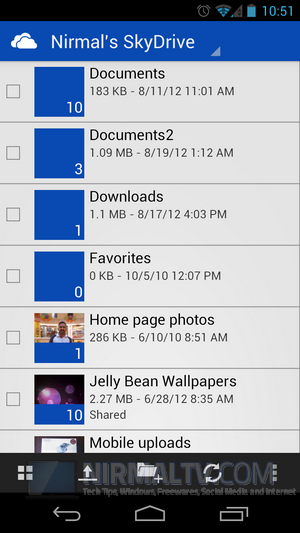
In mid August, SkyDrive updated its look, added features, upgraded its apps for PC and Mac, and announced that a SkyDrive for Android app was coming to complement the apps for iOS and Windows Phone:

skydrive android

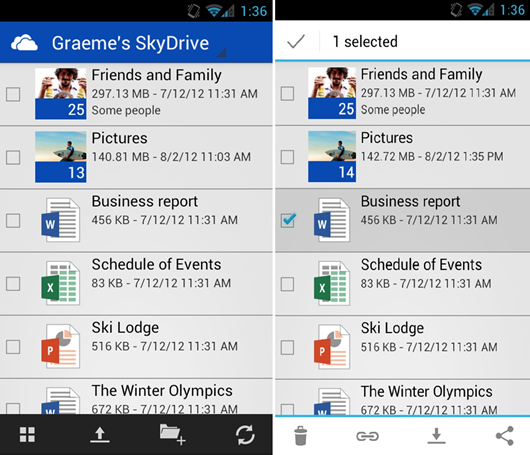
Today, Microsoft is making that Android app available for download from the Android Marketplace, announcing the new app in a blog on the Inside SkyDrive blog*.  According to the post, the app is designed to work best with Android 4.0 (ICS, or Ice Cream Sandwich), but it is also “fully functional on Android 2.3 and above”.

The app includes the usual features:

Access your SkyDrive—documents, photos, and other files, plus the files other people have shared with you.View recently used documents.Choose multiple photos or videos to upload from your phone.Share your files and photos—send a link in email or in another app.Open your SkyDrive files from other Android apps.Easily manage your files—delete or create new folders.

… although at least according to one tweet from Peter Bright from Ars Technica, the Android app won’t do everything the Windows Phone version will do:

SkyDrive for Android can't open a OneNote document even though I have OneNote for Android installed. Is that expected behaviour?

Apparently the iOS app won’t open OneNote files either, according to a reply to @DrPizza’s tweet from Romit Mehta.

From what we’re hearing, the SkyDrive for Android app is part of Wave 5 Milestone 4, which should include the appearance of a Recycle Bin for SkyDrive, and of course we’re still waiting for updates to Calendar, support for Excel forms, and more, so there’s more to come for SkyDrive before Windows 8 ships, we hope.

*  Just a note on Microsoft’s blogging conventions – back in the day we had a blog for every product, and lots from team members.  Many of those were on Spaces, and many of those links are dead now.  Then Microsoft aimed to consolidate their blogs and blogging strategy, and we eventually came to the “Inside Windows Live” blog, which didn’t work when Microsoft dropped “Windows Live” branding.  It was renamed “Inside SkyDrive, Hotmail, and Messenger” (although it’s still referred to as “Inside Windows Live” in the Windows Blog navigation), but that of course is already outdated, and so we have a new “Inside SkyDrive” blog.  Hotmail, which is now transitioning to Outlook.com, has joined the Outlook blog (btw does that mean that Hotmail/Outlook.com is part of Office, now?), and so that leaves Messenger out in the cold, where it most likely is as a product, too.

(edit: fixed the links)


View the original article here

Wednesday, September 5, 2012

Take a Full Backup of Android Phone without Rooting

Generally when you want to take a complete backup of your Android phone, you will need to make sure that the phone has root access or in other words the phone is rooted. But not all users might be interesting in rooting their phones as it might void the warranty. But now you can take a complete backup of your phone using the Ultimate Backup Tool developed by a member of XDA Developers forum.

Ultimate Backup Tool is a free app for taking a full backup of your Android phone. The app comes with multiple backup options namely with apps or without apps.

UBT

The process to take a backup is simple, just connect the phone using the USB cable and enable debugging mode on your phone. Now select the choice from the above screen. Once you select them, you will see a backup option on your phone. Enter the backup password and continue.

Enter password Backup started

The backup will be saved in C: drive in the folder backup. The app works on Android ICS and above. We tried it on Galaxy Nexus and it worked well.

More details on the tool, including download links available here.


View the original article here

SkyDrive for Android Released

SkyDrive is a popular file sharing service from Microsoft which provides around 25GB free space (7GB to new users). The mobile app for SkyDrive was available for Windows Phone, iOS and also Windows. Microsoft has now released the official SkyDrive app for Android phones. The app is now available for download from Google Play and is supported on Android 2.3 and up.

Although the app works with GingerBread (Android 2.3), it is designed to work best with ICS. This new app for Android is similar to apps for Windows Phone and iOS and is a key part of making sure your SkyDrive files are accessible and shareable from all your devices.

SkyDrive for Android SkyDrive for Android_1

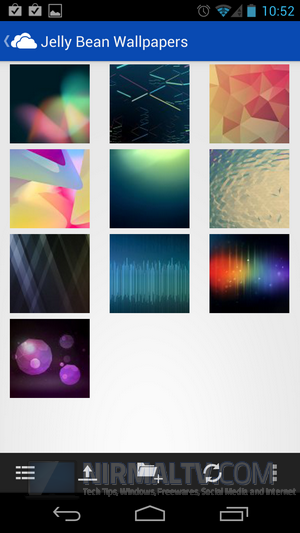
The interface is pretty slick and fast and also user friendly. There are different views available for files especially for images. You can create new folders inside your drive and also easily upload files from your phone.

What does this app offer;

Access all of your SkyDrive content including files shared with you.View recently used documents.Choose multiple photos or videos to upload from your phone.Share your files and photos – send a link in email or in another app.Open your SkyDrive files in other Android apps.Manage your files – delete, or create new folders

You can download SkyDrive for Android from Google Play.


View the original article here

Tuesday, September 4, 2012

Droid Manager- Android File Backup and App Manager

Since Android phones are developed by multiple vendors, they provide their own tool to connect your Android phone to PC. The problem with these application suites is that they provide only basic functions like copying or transferring multimedia files. Droid Manager is an excellent all-in-one Android file and app manager that can manage any task, files, and apps in your android mobile phone.

You can backup your files and apps using this powerful tool. To connect the phone to Windows, you need to install the app in your Android phone as well and then install the desktop app. Once you connect the phone to your desktop, it is automatically detected by the application.

Droid Manager

It lists all folders by default and you can navigate to any particular folder in the phone. There are quite a lot of advanced options available including ROM manager.

Droid Manager_1

Rom Manager

What features does Droid Manager Offer?

Navigate through phone files.Copy from / to device.Search for files on the device.Change permissions.Install user & system apps (to install system apps your phone mus be rooted)Fix APK files title saved locally, view permissions and required SDK version.Get build.prop file from device, change it and save back to device.Create zip files, sign and push to device external storage.Execute Fastboot commands, mostly used commands are built-in (e.g flash partition, erase partition)Supports transferring files from / to device via wi-fi by using the Android App provided.Extract custom Rom and edit build.prop, replace system / user apps, edit / add init.d scripts, add / remove kernel.Change Boot Animation.Change default Ring Tones.Export and sign output zip file.Create backup zip file that contains the system files to be effected by applying a theme or a mod. The zip file can be flashed via CWM.

Requirements:

.Net Framework 4.Fastboot & ADB drivers installed.Android 2.1+Device USB Debugging turned on (Settings -> Developer Options -> USB Debugging).Forward ports 8000 & 8001 in the router for Wi-Fi Transfer.

Overall the app is an advanced free tool to manage your Android phone.

Download Droid Manager


View the original article here

Monday, September 3, 2012

IFA 2012: Haier Joins the Ranks of Android Tablet Makers

The bigshots that were expected to unveil tablets at IFA 2012 did exactly that, with Samsung and Sony showcasing new slates. A name we don’t usually associate with tablets is Haier, that unveiled some new tablets at IFA 2012. Chinese based company Haier is now one of the tablet makers and we knew this name from the household appliances business, devices that this company makes.

One of Haier’s fresh products includes an iPad Killer, a tablet called Maxi Pad 1012. It adopts the 9.7 inch diagonal and 1024 x 768 pixel resolution of older iPads (1st and second generation) and runs Android 4.0 ICS out of the box. The tablet relies on an ARM Cortex A8 processor and comes with WiFi b/g/n connectivity, 8 GB of storage, a microSD card slot, a mini USB port and mini HDMI connector. No information about the CPU, RAM or battery on this device, but it sounds pretty decent so far.

The company also unveiled a phone, called the Phone Pad 551, that’s actually a phablet with a 5.4 inch 940 x 540 pixel resolution. The device runs a mystery version of Android, maybe Jelly Bean, has an 8 MP camera and 4 GB of storage on board, as well as WiFi, 3G and GPS. No info about pricing sadly.

If you like this post, make sure you subscribe to our RSS Feed or follow us on Twitter, Facebook, Google+, YouTube for more interesting articles and video reviews! Also you can recommend Tablet News on Google:

View the original article here

IFA 2012: Lenovo Showcases IdeaTab S2110 and A2107 Slates, With Android 4.0 ICS

We already informed you that Lenovo showcased the IdeaTab A2109 tablet at IFA 2012 in Berlin and now they have another two models to show. I’m talking about the Lenovo IdeaTab S2110, that we already knew about and the A2107, a slightly more minimal version of the A2109. The S2110 tablet is a 10.1 inch slate with an IPS LCD 1280 x 800 pixel display and 420 nits of brightness.

This slate attaches to a keyboard dock, that will allow you to switch between notebook and tablet with ease. 10 finger touchscreen input is supported and inside the device we find the Qualcomm 8060A/8260A 1.5 GHz dual core processor aka the Snapdragon S4. This device offers 32 GB of eMMC internal memory and its battery will provide 10 hours of battery life. With the keyboard dock you will reach as high as 20 hours of battery life, but the package will be thicker. Without the dock the unit weighs 580 grams.

At the back of the S210 there’s a 5 megapixel camera with autofocus and single LED flash, while at the front there’s a 1.3 megapixel shooter for video calls. Other specs include 1 GB of RAM, Bluetooth 4.0, FM radio and WiFi. IdeaTab S2110 goes for $399 in USA. The A2107 runs Android 4.0 ICS and features a 7 inch display, a microSD card slot, Bluetooth 4.0, RM radio, HD display and it will have a WiFi and 3G model.

If you like this post, make sure you subscribe to our RSS Feed or follow us on Twitter, Facebook, Google+, YouTube for more interesting articles and video reviews! Also you can recommend Tablet News on Google:

View the original article here