This is default featured slide 1 title

Lorem ipsum dolor sit amet, consectetur adipisicing elit, sed do eiusmod tempor incididunt ut labore et dolore magna aliqua. Ut enim ad minim veniam. blogger theme by BTemplates4u.com.

This is default featured slide 2 title

Lorem ipsum dolor sit amet, consectetur adipisicing elit, sed do eiusmod tempor incididunt ut labore et dolore magna aliqua. Ut enim ad minim veniam. blogger theme by BTemplates4u.com.

This is default featured slide 3 title

Lorem ipsum dolor sit amet, consectetur adipisicing elit, sed do eiusmod tempor incididunt ut labore et dolore magna aliqua. Ut enim ad minim veniam. blogger theme by BTemplates4u.com.

This is default featured slide 4 title

Lorem ipsum dolor sit amet, consectetur adipisicing elit, sed do eiusmod tempor incididunt ut labore et dolore magna aliqua. Ut enim ad minim veniam. blogger theme by BTemplates4u.com.

This is default featured slide 5 title

Lorem ipsum dolor sit amet, consectetur adipisicing elit, sed do eiusmod tempor incididunt ut labore et dolore magna aliqua. Ut enim ad minim veniam. blogger theme by BTemplates4u.com.

Followers

Showing posts with label SkyDrive. Show all posts

Thursday, September 6, 2012

SkyDrive for Android released

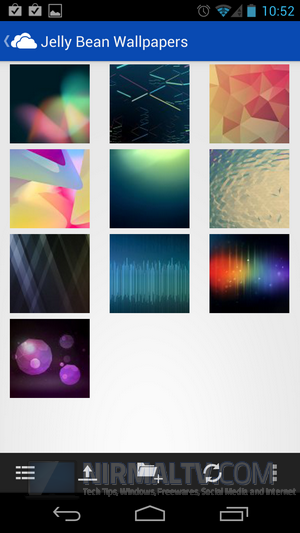
In mid August, SkyDrive updated its look, added features, upgraded its apps for PC and Mac, and announced that a SkyDrive for Android app was coming to complement the apps for iOS and Windows Phone:
skydrive android

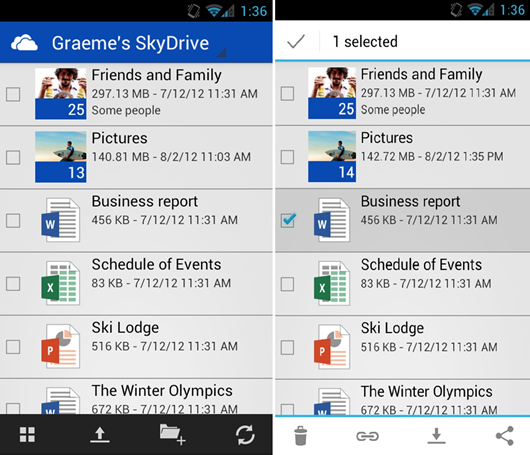
Today, Microsoft is making that Android app available for download from the Android Marketplace, announcing the new app in a blog on the Inside SkyDrive blog*.  According to the post, the app is designed to work best with Android 4.0 (ICS, or Ice Cream Sandwich), but it is also “fully functional on Android 2.3 and above”.

The app includes the usual features:

Access your SkyDrive—documents, photos, and other files, plus the files other people have shared with you.View recently used documents.Choose multiple photos or videos to upload from your phone.Share your files and photos—send a link in email or in another app.Open your SkyDrive files from other Android apps.Easily manage your files—delete or create new folders.

… although at least according to one tweet from Peter Bright from Ars Technica, the Android app won’t do everything the Windows Phone version will do:

SkyDrive for Android can't open a OneNote document even though I have OneNote for Android installed. Is that expected behaviour?

Apparently the iOS app won’t open OneNote files either, according to a reply to @DrPizza’s tweet from Romit Mehta.

From what we’re hearing, the SkyDrive for Android app is part of Wave 5 Milestone 4, which should include the appearance of a Recycle Bin for SkyDrive, and of course we’re still waiting for updates to Calendar, support for Excel forms, and more, so there’s more to come for SkyDrive before Windows 8 ships, we hope.

*  Just a note on Microsoft’s blogging conventions – back in the day we had a blog for every product, and lots from team members.  Many of those were on Spaces, and many of those links are dead now.  Then Microsoft aimed to consolidate their blogs and blogging strategy, and we eventually came to the “Inside Windows Live” blog, which didn’t work when Microsoft dropped “Windows Live” branding.  It was renamed “Inside SkyDrive, Hotmail, and Messenger” (although it’s still referred to as “Inside Windows Live” in the Windows Blog navigation), but that of course is already outdated, and so we have a new “Inside SkyDrive” blog.  Hotmail, which is now transitioning to Outlook.com, has joined the Outlook blog (btw does that mean that Hotmail/Outlook.com is part of Office, now?), and so that leaves Messenger out in the cold, where it most likely is as a product, too.

(edit: fixed the links)

View the original article here

Wednesday, September 5, 2012

SkyDrive for Android Released

SkyDrive is a popular file sharing service from Microsoft which provides around 25GB free space (7GB to new users). The mobile app for SkyDrive was available for Windows Phone, iOS and also Windows. Microsoft has now released the official SkyDrive app for Android phones. The app is now available for download from Google Play and is supported on Android 2.3 and up.

Although the app works with GingerBread (Android 2.3), it is designed to work best with ICS. This new app for Android is similar to apps for Windows Phone and iOS and is a key part of making sure your SkyDrive files are accessible and shareable from all your devices.

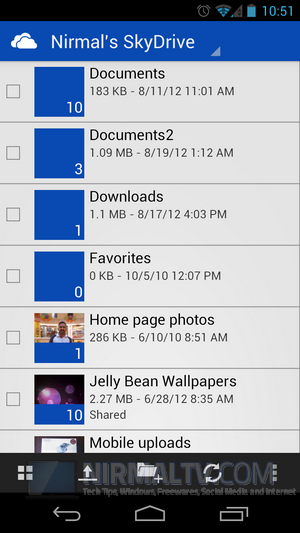
SkyDrive for Android SkyDrive for Android_1

The interface is pretty slick and fast and also user friendly. There are different views available for files especially for images. You can create new folders inside your drive and also easily upload files from your phone.

What does this app offer;

Access all of your SkyDrive content including files shared with you.View recently used documents.Choose multiple photos or videos to upload from your phone.Share your files and photos – send a link in email or in another app.Open your SkyDrive files in other Android apps.Manage your files – delete, or create new folders

You can download SkyDrive for Android from Google Play.


View the original article here